Help with login problems  

Having problems logging in?

Most people use this site without any problems, but occasionally people have trouble logging in. This page is intended to help you resolve these problems. If, after trying the advice on this page, you are still unable to log in, please contact technical support using the details at the bottom of the page.

How to tell if you are logged in

After you log in, the system shows your user name in the 'Who's Online' block. The 'User Menu' block will contain options such as 'Account Information'. If you can't see these, then you are not logged in. If you see the link to this page that says 'Having problems logging in?' then you are not logged in.

What happens when you try to log in?

If, when you try to log in, you get a message saying "Try Logging in Again", please read section (1) below.

If you see no message, but the system will not let you log in, please read section (2) below.

1. Password Problems

If you are unable to log in using the password sent in the signup email, please check you are entering it exactly as it appears in the email message. If you are using copy and paste, it is possible to pick up an extra space at the end of the password without noticing.

Passwords are case sensitive, so aBc is a different password to AbC.

If you have changed your password and can't log in with the new password, or you can't remember your password, please click here and we'll set up a new password.

2. Cookie Problems

Cookies are small pieces of information that are stored on your computer. This site uses cookies to keep track of who is logged in. You must have cookies enabled to use this site.

If the system accepts your password but you are still not logged in, the problem is probably with your browser cookies. Deleting the cookies usually solves this problem.

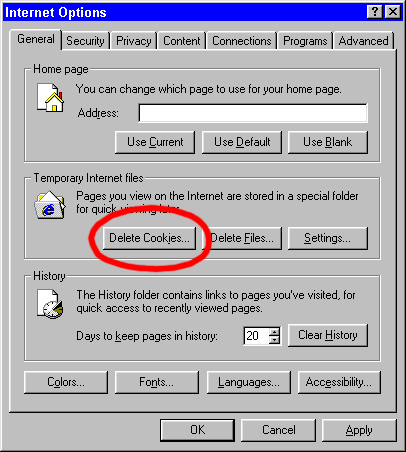
To do this in Internet Explorer, go to the Tools menu and select Internet Options. You will see this dialog box:

Click the 'Delete Cookies' button (marked in red). You should then be able to log in.

Contact Technical Support

If the above advice does not help, please contact us using the form below, detailing the exact problem you are experiencing:

Your User Name: 
Your Email Address: 
Describe the problem here: 

If you can't use the form or prefer to use email, contact us at [email protected]. Please include details of which site you are using and the exact problem you are experiencing.